

If you haven’t been paying attention, KTC has been becoming a pretty big player in the world of gaming monitors, and they’re absolutely a company you should be taking a look at if you’re in the market. I’ve been using their H49S66 Ultrawide monitor (and previously reviewed it), and it’s been awesome.
Related
KTC 49″ DQHD Curved Gaming Monitor | H49S66 Review: Ultrawide At A Great Entry Point
There might not be any going back after this.
My personal issue, however, is that I now have the Ultrawide firmly mounted to my Asetek sim racing rig, so I was back on the market again for a gaming monitor for my desk. And as much as I did enjoy using the Ultrawide in this setting too, well… my desk space comes with a premium, and I also don’t have a lot of it to spare.
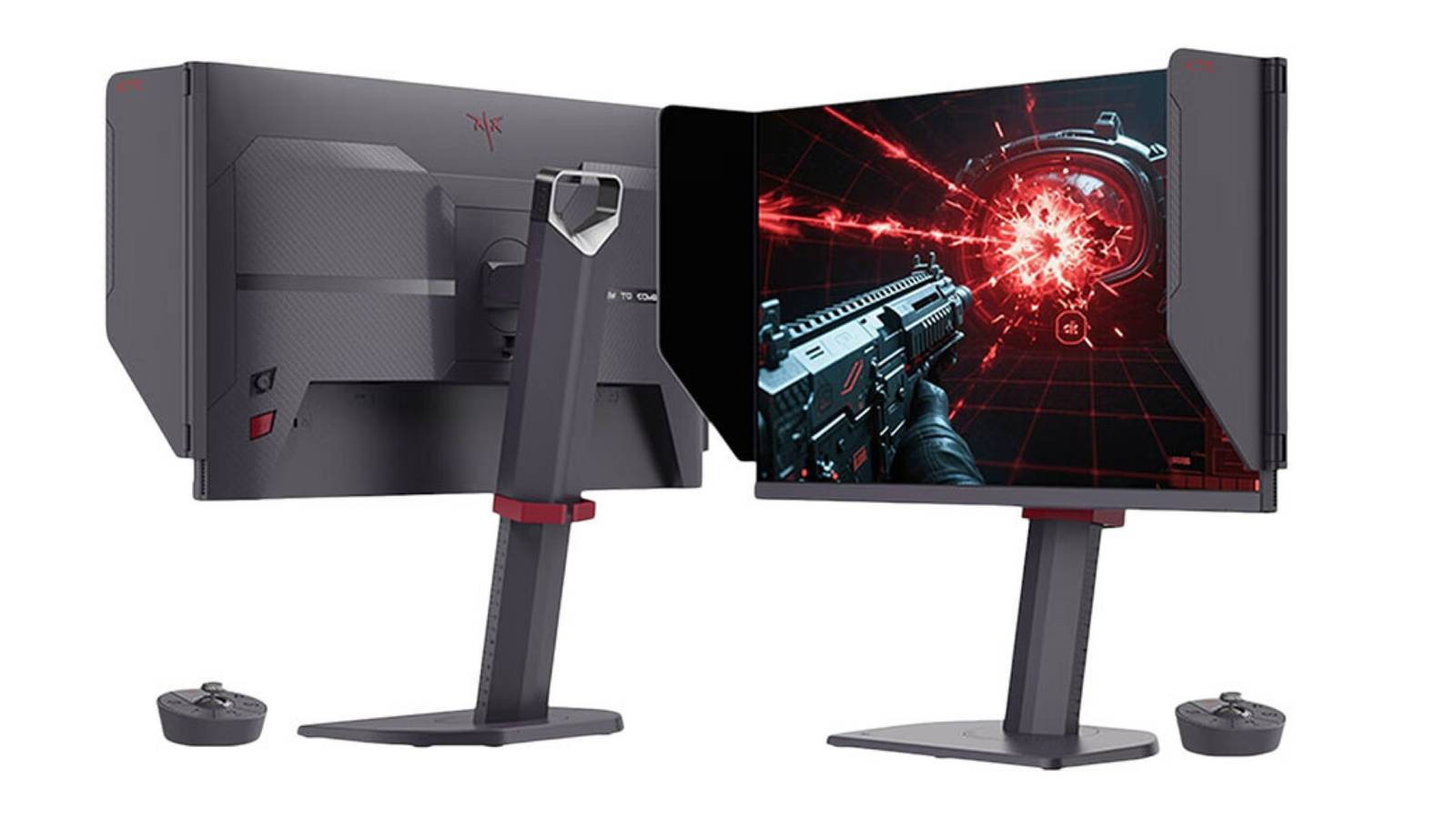
Enter the KTC 25M1, another slick gaming monitor offering from the company that also happens to be much more desktop friendly, measuring in at 24.1 inches instead of the whopping 49 of my Ultrawide. I’ve been testing this unit out for several weeks at this point, and I must say, it’s been a thoroughly pleasant and impressive experience all around.
Shipping, Unboxing, and Setup
Step one when receiving a new piece of tech hardware is always the shipping, unboxing, and setup process. In the case of the KTC 25M1, I really don’t have too much to discuss, and that’s a good thing. My only “concern” I probably need to pass along is that it arrived without an outer shipping box, and was instead waiting at my doorstep with giant red letters screaming “MASTER” and showing off the cool design of the monitor.
This is mostly relevant if you’re someone worried about porch pirates in your neighborhood, so maybe just make sure you’re home when it’s being delivered. The other thing here is that the lack of an outer box means the monitor is a little more in the hands of the delivery driver/shipping service, which can be a little scary too. But for me, no harm, no foul. My box arrived in great shape, was well-sealed to prevent any dust/debris from entering, and got the job done.
From here, setup couldn’t be easier. With both KTC monitors I’ve now used, each has one simple screw on the bottom of the stand that connects the pieces together, and you’re up and running. Genuinely, you can be gaming on this thing within perhaps 120 seconds of unboxing, which is a type of simplicity I really can appreciate.
I’ll be honest, as much as I like to think of myself as a hardcore PC gamer and fledgling streamer/content creator, I don’t currently have the most usable desk space. My desk is awesome, but it’s also apartment life for me in the city, so all square footage comes with a premium. For me, the small size of the 25M1 from KTC is pretty much perfect.
I’ve been testing this unit out for several weeks at this point, and I must say, it’s been a thoroughly pleasant and impressive experience all around.
I’ve gamed on larger monitors before (even excluding my Ultrawide), so going into this review, I definitely wondered if I’d find 24 inches a bit too small. In practice, however, I think the size is really nice, fits my space perfectly, and isn’t leaving me wishing for more. This is, of course, a huge win.
It’s small enough to leave room for a second monitor if you need one, but also feels like enough real estate for me when playing just about anything. It’ll be up to you if, say, you’re a big FPS player and what the extra advantage of something like an Ultrawide, but as a normal-ratio monitor, this one absolutely gets the job done and gives you that sweet, sweet extra desk space.
The base of the stand is also small, helping further with any space concerns, and the unit also has all the swivel, tilt, and lift capabilities that you could need. As a nice little bonus here too, the 25M1 comes with adjustable flaps on either side of the screen that serve as light blockers, and while I didn’t think these would really make a difference initially, I’ve found this a very nice feature to have.
There’s also an optional but nifty toggle switch that comes with and can sit on your desk, which serves as a more readily available menu navigator if you’d like to tweak any settings. This isn’t a necessary part of a gaming monitor, but I do appreciate the convenience.
Lastly, the back of the unit also dons a collapsible headphone holder, further adding some utility and space optimization to the monitor that really goes the extra mile here.
Putting It To the Test
But of course, the most important part of a gaming monitor is… well, how it functions as a gaming monitor. Despite the previously mentioned small size of the KTC 25M1, this little unit packs a punch.
The 1080p screen looks very sharp and crisp, with a range of colors and clarity that I’ve been more than happy with after diving into the settings menus and calibrating everything exactly how it looks best for my room. There’s a nearly objective sacrifice if you’re opting for something non-4K and/or OLED these days, but there’s also certainly something to be said about actual performance over the fanciest resolution, which is where the 25M1 shines.
I don’t have the best GPU in the world, but that’s totally okay with this monitor, which is FresSync and G-SYNC compatible, so even I can stop experiencing screen tearing. This was an issue I’d noticed with my previous main desktop monitor, and it’s yet to be an issue for me with the 25M1.
Related
MelGeek Centauri80 Hall Effect Gaming Keyboard Review: Out of This World
Houston, we have a new every day keyboard.
The star of the show here and what KTC seems to push the most with this monitor is the high refresh rate and the speed of the TN panel, which work together to virtually eliminate ghosting, blur, and any other nasty things like that which really matter when you’re gaming at a high level or playing twitchy titles, like a lot of shooters.
At the end of the day, for me, I’m just not having any issues at all with the 25M1, and in the world of consumer tech, “no issues” really is what we’re all looking for. The 25M1 works, it performs well, it looks great for the money, and I’ve honestly been super, super pleased with it.
I’ll also point out that I used to notice eye strain on previous monitors, and I don’t feel it nearly as much with this unit. As someone who feels like they probably wear glasses today because of burning my eyes out on the Game Boy Advance back in the day, features like what the KTC 25M1 has to keep my eyes feeling better during a long session is truly great.
Additional Specs and Info
If you’re looking for the detailed tech specs and reasons they matter on paper, here is what KTC provided me with to pass along:
- 400Hz / 0.5ms — eliminates motion blur and ghosting, which is a real advantage in fast-paced shooters
- Fast TN panel — pro-grade pixel transitions, minimal ghosting, purpose-built for speed
- FreeSync & G-SYNC compatible — no tearing regardless of your GPU
- HDR10 + 98% sRGB + 85% DCI-P3 — surprisingly solid color for a TN panel
- Detachable shielding hood — blocks side glare, which actually makes a difference during long sessions
- Fully adjustable stand (height, tilt, swivel, pivot) + Low Blue Light / Flicker-Free for eye care
- Dual DP 1.4 (up to 400Hz) + Dual HDMI 2.0 — easy multi-platform setup
You’ll also again want to note that this is not a 4K monitor, so if that is something that’s non-negotiable for you when shopping for a new monitor, just keep that in mind. For my money, I still think the 25M1 is one of the best monitors in this price range I’ve ever used, so I’m okay rocking with 1080p for how I use my PC (and as I use my 4K OLED TV for regular PS5/Switch 2 console gaming).
Of course, if you want even more detailed spec breakdowns, KTC has it all for you at their website. The bottom line for me is that I’m simply enjoying using the 25M1. My games look great on it without any screen tearing, blurring, or any reason for concern at all. I also really do genuinely notice and appreciate the efforts made for eye comfort and minimal strain thanks to the integrated low blue light mode and flicker-free design.
It’s currently listed at $329.99 (marked down from $399.99), which truly feels like a perfectly fair price for as much as I’ve been enjoying the KTC 25M1 since I’ve started my review process. This is one to take a look at if all of the above sounds up your alley.
KTC 25M1 Product Home Page
If you’re looking for a small, budget-friendly gaming monitor but don’t want to sacrifice too much performance (and are okay without 4K), the 25M1 from KTC really is a solid option. The 24.1 inch screen may be a bit small for some, but I really am enjoying the extra desk space I’m now left with while still being able to leverage a high-performing monitor all around. Eye strain is minimal, it looks great, and it’s won the spot on my desk as my current main gaming monitor.
Score: 8.5/10
Pros
Cons
Lightweight, small footprint monitor that leaves tons of desk space
Plastic construction feels a little less than premium at times
Strong performance that’s always clear and comfortable
Will be a little too small for some
Colors look great and eye strain is minimal
Not 4K
A great option for serious gamers on a bit of a budget
Product provided by KTC for review.
Next
MelGeek Centauri80 Rei Evangelion Edition Keyboard Review: A Shiny Anime Coat on an Amazing Unit
You won’t die. This keyboard will protect you.
