

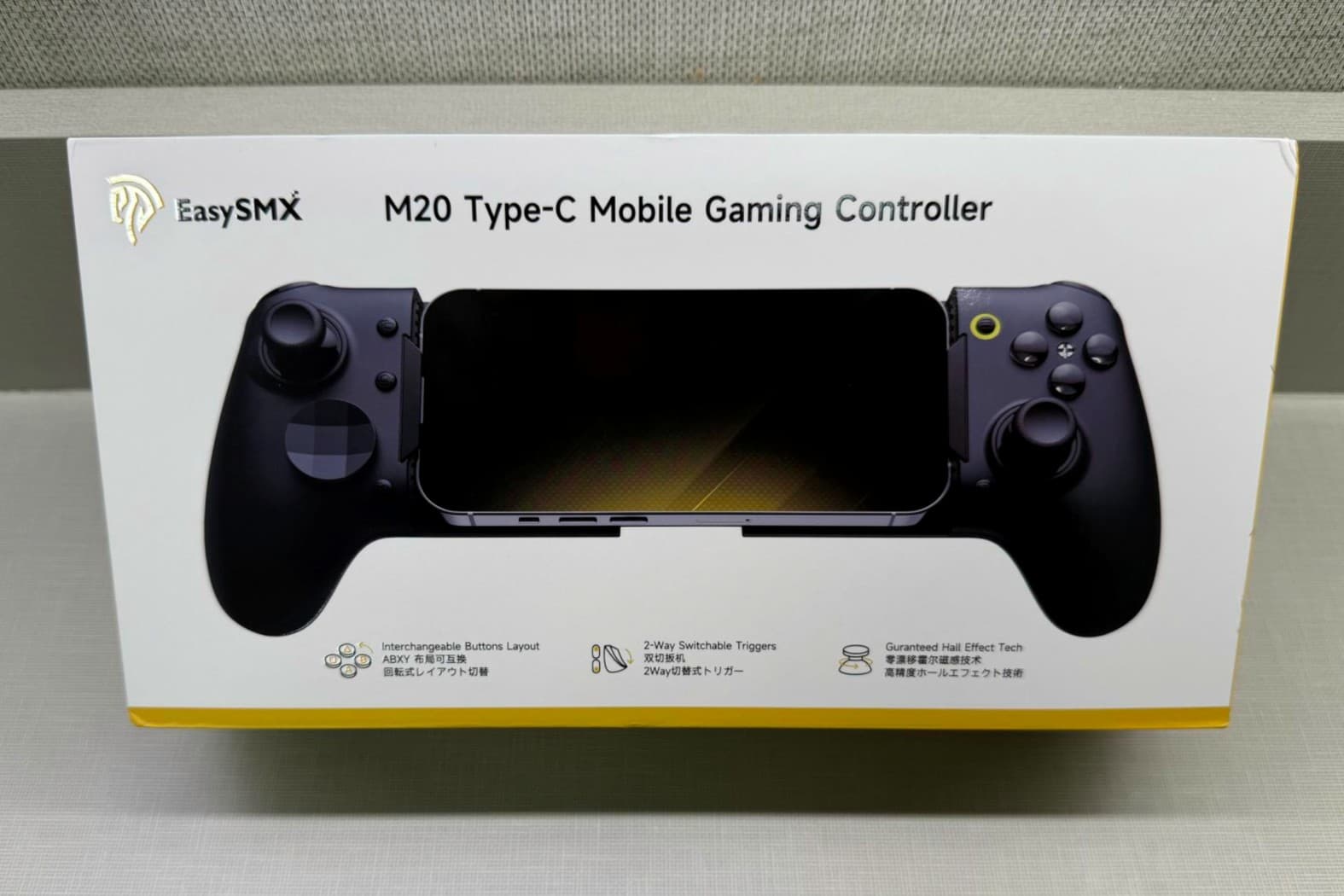
A Premium Feel Without the Premium Price
EXCELLENT
The EasySMX M20 offers a polished and highly responsive mobile gaming experience that feels closer to a dedicated handheld than a typical phone accessory. Despite a few setup quirks, it remains an excellent choice for players who want better performance and immersion without overspending.
PROS
- Hall Effect sticks feel smooth and accurate with no stick drift
- RoSync rotating ABXY layout is great for switching between Xbox Cloud Gaming and PS Remote Play
- Mechanical buttons feel crisp and tactile during gameplay
- Comfortable to hold even during longer gaming sessions
- Built-in vibration motors add extra immersion with supported games
- Works great with the iPad Mini and larger phones
- Programmable back paddles are easy to set up
- Feels very premium for the price
CONS
- Larger phone cases may need to be removed for the USB-C connector to fit properly
- Instructions mention an app, but no app link was included and was not able to be found
- Bluetooth mode instructions confusing/not working
- Stretch design may feel large for people using smaller phones
- Some mobile games still have limited controller support depending on the game itself
-
DESIGN
-
EASE OF USE
-
PRICE
Price
69.99
Price as of 04/30/2026
We may earn a commission when you buy through our links. This helps support MacSources and keeps our content free. Thank you!
Hall Effect sticks, mechanical buttons, and a clever rotating layout bring console-level control to mobile gaming
The EasySMX M20 is made by EasySMX, a company that makes gaming controllers and other gaming accessories for people who play on mobile, PC, and consoles. They are mostly known for making products that include a lot of high-end features without costing as much as bigger brands.
The M20 is designed to make mobile gaming feel more like playing on a real handheld console since it attaches directly to your phone or iPad and gives you physical buttons, triggers, and joysticks instead of relying on touch controls. A lot of people like EasySMX products because they are affordable while still feeling premium, especially with features like Hall Effect sticks, mechanical buttons, and fast response times.
Features
The EasySMX M20 is packed with features that are designed to unlock the full potential of mobile gaming and make it feel more like a true handheld console experience. One of the standout features is the RoSync rotating ABXY layout, which lets you instantly switch between Xbox Cloud Gaming and PS Remote Play without breaking your muscle memory or relearning controls. With a simple twist, the button layout matches your platform with no disassembly or awkward setup needed.
The M20 also features Hall Effect sticks and an ultra-fast 1000Hz polling rate for drift-free precision, smooth controls, and near instant response times that are perfect for FPS, action, and competitive games. Its ultra-stretch design works seamlessly with the iPad Mini and smartphones up to 8.5 inches while keeping your screen fully visible and comfortable to hold whether you’re gaming in bed, on the couch, or on the go.
The controller also uses mechanical micro-switch buttons that deliver crisp tactile feedback and fast actuation so every press feels clean and responsive. Other features like dual-mode trigger locks, programmable M1 and M2 back buttons, turbo support, swappable D-pad options, and immersive haptic feedback with dual grip motors help make long gaming sessions more comfortable while also giving players more control and customization.
Unboxing and Setup
Inside the box, the EasySMX M20 comes with the controller itself, a mini screwdriver, a replaceable D-pad, two rubber foot pads, and a user manual. Right out of the box, the controller feels surprisingly well made for the price point and has a solid feel in the hands without feeling too heavy.
Setup was also pretty simple. Once I unboxed it, it was easy to snap my iPhone 17 Pro Max into place, although I did have to remove my phone case in order for the USB-C connector to seat properly. As soon as the controller connected, it vibrated to let me know it was paired, which was a nice touch. This is also the first mobile gaming controller I have personally used that includes built-in vibration motors, which helps games feel a little more immersive.
The instructions mention an app for Android button mapping as well as a Bluetooth mode, but I could not find any direct app link in the manual, and searching the App Store did not show any results for it either. I also was unable to make any Bluetooth mode work. Even without the app, following the included directions made it easy to map the back paddles to my preferred setup.
When connected to my iPhone 17 Pro Max and iPad Mini A16, both Call of Duty Mobile and Fortnite Mobile recognized the controller right away with no extra setup needed. Games instantly detected it as a controller, and everything worked smoothly from the start.
Overall Use
After using the EasySMX M20 for a while, it honestly made mobile gaming feel much closer to playing on a real handheld console instead of just gaming on a phone or tablet. I mainly used it with my iPad Mini A16 while playing Fortnite Mobile and Call of Duty Mobile, and both games felt much more comfortable and responsive compared to using touchscreen controls. The Hall Effect sticks felt smooth and accurate, especially in fast-paced matches where quick aiming and movement really matter.
The mechanical buttons also felt crisp and responsive, which made shooting, building, and quick movements feel more natural during gameplay. The controller stayed comfortable to hold even during longer gaming sessions, and the built-in vibration motors also added a little extra immersion with games that support it, helping gameplay feel more responsive and realistic during matches. I also liked that the design keeps your hands away from the screen so nothing blocks your view while playing. Overall, the M20 made gaming on my iPad Mini feel more enjoyable, more competitive, and a lot closer to playing on an actual gaming handheld.
Conclusion
Overall, the EasySMX M20 ended up being a really solid mobile gaming controller, especially for the price. I think this is a great mobile gaming controller for anyone who wants to make mobile gaming feel more like playing on a real handheld console without spending a ton of money. It combines premium features like Hall Effect sticks, mechanical buttons, programmable back paddles, and built-in vibration motors into a controller that feels responsive and comfortable to use.
Playing Fortnite Mobile and Call of Duty Mobile on my iPad Mini A16 felt smoother, more comfortable, and a lot more enjoyable compared to touchscreen controls alone. While the missing app information in the instructions was a little confusing and some larger phone cases may need to be removed for the USB-C connection, the overall experience was still very positive. If you play a lot of mobile games, cloud gaming, or remote play and want something packed with features at a reasonable price, the EasySMX M20 is definitely worth checking out.
For more information, visit easysmx.com
