
Close Menu

    Subscribe to Updates

    Get the latest creative news from FooBar about art, design and business.

    Latest Post

    10 Best Indie Games of 2026 (So Far)

    June 21, 2026

    Ghost at Dawn is about Fear, Empathy, and Questionable Choices

    June 21, 2026

    Final Fantasy X 25th Anniversary Fan Art Project Starts

    June 21, 2026
    Facebook X (Twitter) Instagram
    Trending
    • 10 Best Indie Games of 2026 (So Far)
    • Ghost at Dawn is about Fear, Empathy, and Questionable Choices
    • Final Fantasy X 25th Anniversary Fan Art Project Starts
    • EA College Football 27 Early Access Release Date And Info
    • Nearly 30 Years Later, Only One GTA Cover Actually Shows The Titular Crime
    • If You Haven’t Reserved A Steam Controller Yet, You’ll Have To Wait Until Next Year
    • Love NotebookLM but hate Google? Try this open-source alternative
    • PlayStation CEO: which PS5 games come to PC
    Facebook X (Twitter) Instagram YouTube
    Beteja – Gaming News, Reviews & Latest Releases
    • Home
    • Console Gaming
    • Esports
    • Latest News
    • Mobile Games
    • New Releases
    • PC Gaming
    • Reviews
      • Upcoming Games
    Beteja – Gaming News, Reviews & Latest Releases
    Home»PC Gaming»Dark Souls 2 Path Tracing runs with 60FPS at 4K/DLSS Balanced on an NVIDIA RTX 4080
    PC Gaming

    Dark Souls 2 Path Tracing runs with 60FPS at 4K/DLSS Balanced on an NVIDIA RTX 4080

    AdminBy AdminMarch 24, 2026No Comments3 Mins Read
    Facebook Twitter Pinterest LinkedIn Tumblr Email
    Dark Souls 2 Path Tracing runs with 60FPS at 4K/DLSS Balanced on an NVIDIA RTX 4080
    Share
    Facebook Twitter LinkedIn Pinterest Email

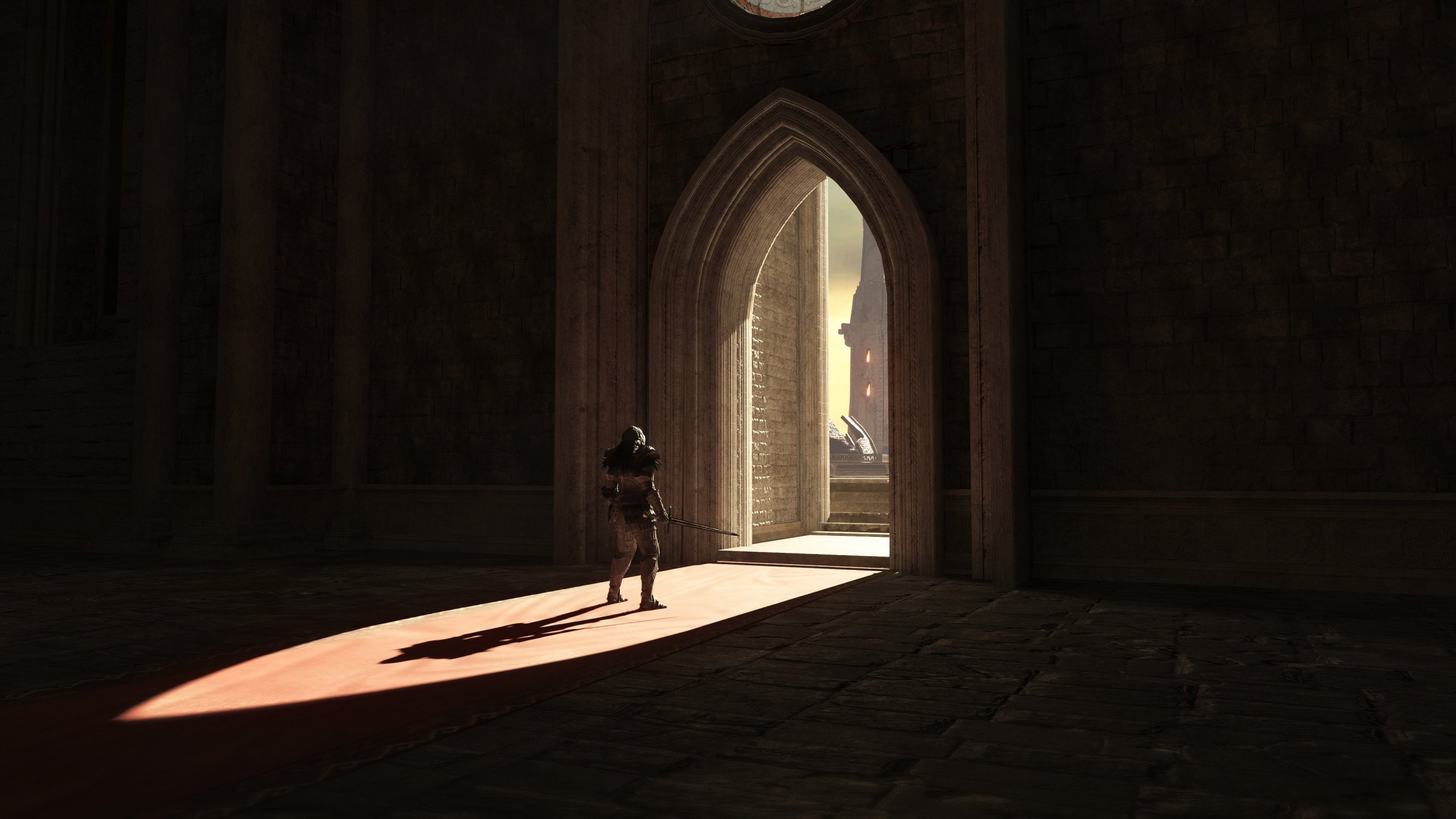
    Twitter/X user ‘iExplosiveRage‘ has been testing the Path Tracing Mod for Dark Souls 2 and shared some new screenshots and performance numbers. According to the user, the Path Tracing Mod for Dark Souls 2 can run with 60FPS, even on an NVIDIA RTX 4080.

    Going into more details, iExplosiveRage was able to get 60FPS at 4K with DLSS Balanced Mode on an NVIDIA GeForce RTX 4080. That was with 3 Path Counts.

    To showcase how good Dark Souls 2 can look with Path Tracing, iExplosiveRage shared four new screenshots. These screenshots show how transformative this upcoming mod will be. Dark Souls 2 never looked this good. And, honestly, I cannot wait to get my hands on it.

    For those who did not know, this Path Tracing Mod will be a part of an upcoming version of the DS2LightingEngine. Thanks to Path Tracing, the lighting in Dark Souls 2 will look better and more consistent. In a way, this modded version feels like a remaster of DS2.

    There is currently no ETA for when the Path Tracing version of the DS2LightingEngine Mod will come out. Naturally, though, we’ll be sure to keep you posted. Until then, you can behold the new screenshots, which you can find at the end of this article.

    Speaking of Dark Souls 2, you may also be interested in this other mod for it. The First Sin InfiniDetail is a mod that aims to eliminate texture LOD pop-in. It will also greatly increase the game’s draw distance. In theory, it should work with the Renewal Project.

    Dark Souls 2 Renewal Project upgrades every texture in the game to 4096×4096 resolution. It also adds roughness maps to every texture, along with fixes to missing/low-quality normal maps, vanilla displacement maps, and the occasional texture seam present on the vanilla files.

    If you want more free content for the game, you should try the Firelink Edition Mod. Dark Souls 2 Firelink Edition adds new weapons, shields, armor pieces, and two whole new miracles. It will also allow players to sell the Soul items at their actual soul value. Soul items display their soul value in the descriptions, and we get some buffed ring effects.

    These three mods are for the Scholar of the First Sin version. If you are still playing the first/vanilla version of DS2, you can use this mod to overhaul its graphics.

    Enjoy and stay tuned for more!

    John is the founder and Editor in Chief at DSOGaming. He is a PC gaming fan and highly supports the modding and indie communities. Before creating DSOGaming, John worked on numerous gaming websites. While he is a die-hard PC gamer, his gaming roots can be found on consoles. John loved – and still does – the 16-bit consoles, and considers SNES to be one of the best consoles. Still, the PC platform won him over consoles. That was mainly due to 3DFX and its iconic dedicated 3D accelerator graphics card, Voodoo 2. John has also written a higher degree thesis on the “The Evolution of PC graphics cards.”
    Contact: Email

    Share. Facebook Twitter Pinterest LinkedIn Tumblr Email
    Admin
    • Website

    Related Posts

    Final Fantasy X 25th Anniversary Fan Art Project Starts

    June 21, 2026

    Campaign Evolved Split-Screen Co-Op Requires PlayStation Plus on PS5

    June 21, 2026

    The Outer Worlds 2 studio Obsidian accused of “violating state wage and hour laws” for profit in California lawsuit

    June 20, 2026

    PUBG creator’s abandoned survival game Prologue is now free for all, with one final gift

    June 20, 2026
    Add A Comment

    Comments are closed.

    Latest Post

    10 Best Indie Games of 2026 (So Far)

    June 21, 2026

    Ghost at Dawn is about Fear, Empathy, and Questionable Choices

    June 21, 2026

    Final Fantasy X 25th Anniversary Fan Art Project Starts

    June 21, 2026

    EA College Football 27 Early Access Release Date And Info

    June 21, 2026
    Top Reviews
    PC Gaming

    Final Fantasy X 25th Anniversary Fan Art Project Starts

    By Admin
    PC Gaming

    Campaign Evolved Split-Screen Co-Op Requires PlayStation Plus on PS5

    By Admin
    PC Gaming

    The Outer Worlds 2 studio Obsidian accused of “violating state wage and hour laws” for profit in California lawsuit

    By Admin
    Beteja – Gaming News, Reviews & Latest Releases
    Facebook Instagram YouTube
    • About Us
    • Contact Us
    • Privacy Policy
    • Terms & Conditions
    • Disclaimer
    © 2026 Beteja.com

    Type above and press Enter to search. Press Esc to cancel.