
Close Menu

    Subscribe to Updates

    Get the latest creative news from FooBar about art, design and business.

    Latest Post

    Pokémon Conquest turns 14, whether you remember it or not

    June 19, 2026

    Review: Brook Wingman P5S – Use (Almost) Any Controller On Switch 2

    June 19, 2026

    How to optimize computer performance

    June 19, 2026
    Facebook X (Twitter) Instagram
    Trending
    • Pokémon Conquest turns 14, whether you remember it or not
    • Review: Brook Wingman P5S – Use (Almost) Any Controller On Switch 2
    • How to optimize computer performance
    • PS5 Finally Getting Popular 2024 Open World Game, Out Soon
    • Night Ranger Releases Remastered Hit from 1983 and Announces New Album and Tour
    • Fans Wear Diapers During Concerts, I’ve Smelled Them
    • Mobile MOBA Honor of Kings Drops Massive Update HOK Plus 2.0 – Gamezebo
    • Relink – Endless Ragnarok hands-on report, demo available today – PlayStation.Blog
    Facebook X (Twitter) Instagram YouTube
    Beteja – Gaming News, Reviews & Latest Releases
    • Home
    • Console Gaming
    • Esports
    • Latest News
    • Mobile Games
    • New Releases
    • PC Gaming
    • Reviews
      • Upcoming Games
    Beteja – Gaming News, Reviews & Latest Releases
    Home»Upcoming Games»How to Create the Second Module in Modulus: Factory Automation
    Upcoming Games

    How to Create the Second Module in Modulus: Factory Automation

    AdminBy AdminApril 2, 2026No Comments2 Mins Read
    Facebook Twitter Pinterest LinkedIn Tumblr Email
    How to Create the Second Module in Modulus: Factory Automation
    Share
    Facebook Twitter LinkedIn Pinterest Email

    Even when you are used to playing factory and automation simulation games, Modulus: Factory Automation’s early learning curve can become a head-scratcher.

    There’s a tutorial to help you learn the ropes, but even with the objectives being laid out clearly, creating the second module is the first of many difficult tasks you’ll have to overcome with little guidance, and here’s a quick guide on how to make it.

    How to Create the 2x8x2 Module in Modulus: Factory Automation

    Screenshot by Prima Games

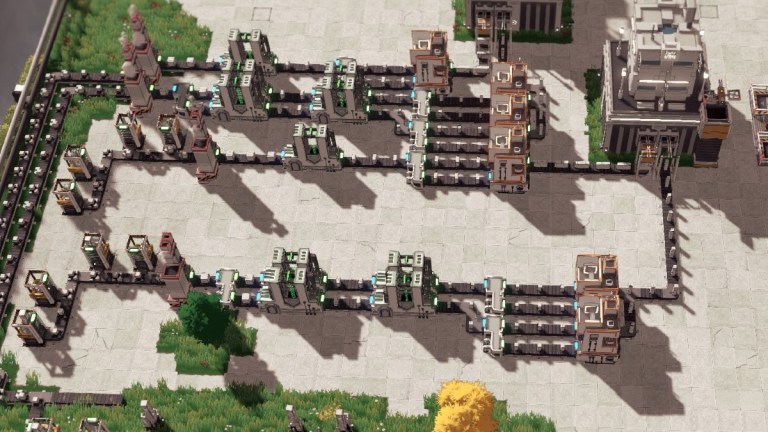
    When you follow the tutorial, you’ll reach the “create a Second Module” objective right after learning how to copy layouts. However, that copied layout doesn’t have the correct buildings to create the second module.

    The correct layout needs to be: Miner > Furnace > Cutter > Cutter > Assembler

    The product comes out of the furnace as a 4x4x4 module and needs to be cut to a 2x4x4 size first (the second cut size configuration). Since you are cutting the module, you’ll have twice as many modules. Make sure to split the conveyor belt after the first Cutter and insert it into another cutter to maximize efficiency.

    Screenshot by Prima Games

    The configuration for the second cutter will be the second cut size, with the module standing horizontally. You’ll end up with a 2x4x2 module after the second cutting process. Split your second cutter again to maximize efficiency.

    Screenshot by Prima Games

    Create two Assemblers and insert both 2x4x2 modules. Stack them on top of each other to create the 2x8x2 module.

    For maximum efficiency, you should have: 4x Miner > 1x Furnace > 4x Cutter > 8 Cutter > 4 Assemblers. This ratio is efficient but produces way too many 2x8x2 modules. You can still create this setup, since you might use the 2x8x2 module elsewhere as you progress to more complex facilities.

    After finishing the whole factory, create a crane next to the Basic Core Facility: Small, and create a single line conveyor belt grabbing all the 2x8x2 modules from the Assemblers. A conveyor belt this early can handle 60/m, which is exactly the number of the 4 Assemblers (15/m each) on this production line.

    Merge all outputs from the Assemblers into one conveyor belt leading to the Core Facility. If you need more of these exact modules, you can easily use a Splitter to take some of these to other production lines.

    Share. Facebook Twitter Pinterest LinkedIn Tumblr Email
    Admin
    • Website

    Related Posts

    PS5 Finally Getting Popular 2024 Open World Game, Out Soon

    June 19, 2026

    GTA 6 Pre-Orders Start on June 25 in Canada, Cover Art Finally Revealed

    June 19, 2026

    FIFA World Cup 2026 Today: Live news updates with second round of group fixtures about to start

    June 18, 2026

    Dark Souls 2 seamless co-op mod is “close” to being playtest-ready, having morphed into one of its creator’s “most complicated and ambitious projects to date”

    June 18, 2026
    Add A Comment

    Comments are closed.

    Latest Post

    Pokémon Conquest turns 14, whether you remember it or not

    June 19, 2026

    Review: Brook Wingman P5S – Use (Almost) Any Controller On Switch 2

    June 19, 2026

    How to optimize computer performance

    June 19, 2026

    PS5 Finally Getting Popular 2024 Open World Game, Out Soon

    June 19, 2026
    Top Reviews
    Upcoming Games

    PS5 Finally Getting Popular 2024 Open World Game, Out Soon

    By Admin
    Upcoming Games

    GTA 6 Pre-Orders Start on June 25 in Canada, Cover Art Finally Revealed

    By Admin
    Upcoming Games

    FIFA World Cup 2026 Today: Live news updates with second round of group fixtures about to start

    By Admin
    Beteja – Gaming News, Reviews & Latest Releases
    Facebook Instagram YouTube
    • About Us
    • Contact Us
    • Privacy Policy
    • Terms & Conditions
    • Disclaimer
    © 2026 Beteja.com

    Type above and press Enter to search. Press Esc to cancel.