

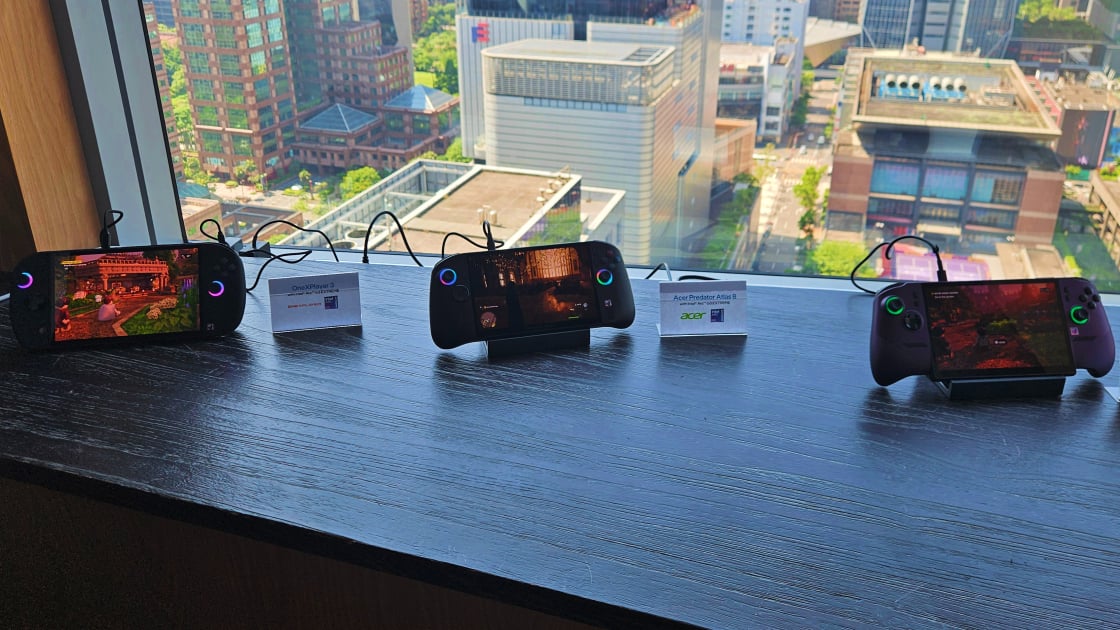
PC gaming handhelds will soon get punched way up in potency…and price. Just ahead of Computex 2026, Intel announced its Arc G Series chips, outlining a new platform designed specifically for use in PC gaming handhelds. Fresh gaming handhelds running this silicon were one of the biggest stories from the show, headlined by three new devices from Acer, MSI, and OneXPlayer.
In Taipei, I spent time with the Acer Predator Atlas 8, the MSI Claw 8 EX AI+, and the OneXPlayer 3 at an Intel event—all three of which include the top-end G3 Extreme chip from the Arc G Series. Cost will be a major concern: Only MSI provided a (not final) price estimate, with the Claw expected to cost around $1,500.
Beyond those three handhelds, Asus also announced a special edition update to its ROG Xbox Ally handheld for the 20th anniversary of its ROG brand. I went hands on with this device, too, but it’s still running AMD’s Ryzen Z2 Extreme processor that was found in the last iteration, not Intel’s new silicon. It received some exciting design updates, however, and Asus will remain a runner in this race.
Before you potentially commit this much cash (or even more), how do these handhelds differ? What performance can you expect, and what does the future of the gaming handheld category look like?
The Best Gaming Handhelds at Computex 2026: Hold On to Your Wallets
The Elephant in the Room: Prices
As mentioned, cost will be a chief concern here. It’s an unavoidable topic in computing right now due to the memory crunch, but it hit this category hard. A $1,500 updated MSI Claw is just an estimate at this time, and MSI was the only one of the three to provide a rough price for its new Arc G3 Extreme handheld. Just mentioning $1,500 sucks the air out of the metaphorical room, so it’s worth starting here.
First, some context. Drawing inspiration from the original Nintendo Switch, the gaming handheld category was born with the Valve Steam Deck. It runs Linux-based SteamOS rather than Windows, but the idea of an accessible PC-gaming handheld with modern computing hardware began with that model. The original Steam Deck launched at $399 in 2022, with boosted models (containing more and faster storage) that ran up to $649. The original Asus ROG Ally followed as the first Windows-based handheld, but still launched at only $599.99 (with an upgraded $699.99 model available too).
MSI Claw 8 EX AI+ (Credit: Dillon Lopez)
Both set expectations for the category and were far easier to justify given their modest power levels. More advanced handhelds from Lenovo and MSI (and Asus’ updated Ally X and Xbox Ally X) pushed prices close to or beyond $1,000 in the years since, but RAM demand has driven up costs across all computer hardware. The Steam Deck itself was recently subject to a major price increase, with the two models now priced at $789 and $949, for nothing new.
Add these rising baseline prices to a brand new, powerful chip and a redesign, and you arrive at the Claw’s floated $1,500 price in mid-2026. Perhaps the other two G3 Extreme handhelds will be markedly less expensive, but I wouldn’t hold my breath. Chip and memory demand alone—not to mention otherwise close feature parity I’ll get to below—nearly ensure similar costs. Also note that OneXPlayer is not shy about charging high prices: It currently sells other costly handhelds, including the OneXPlayer Apex, which costs well over $2,000. With some premium features the others don’t have, expect the OneXPlayer 3 to be costly, too.
OneXPlayer 3 (Credit: Matthew Buzzi)
For many, the debate over buying one of these handhelds ends when they hear $1,500—totally reasonable! We’ve veered very far away from the Steam Deck’s low-price appeal, and even the pricier Windows handhelds that followed.
These prices have firmly entered gaming laptop territory, and while those are more expensive right now, too, you can get a reasonably potent gaming laptop for the same price. The handheld form factor really needs to appeal to you, because while both run Windows 11, you get a full-fledged PC with a laptop. That makes for a more compelling value proposition, useful in daily life, versus a more specialized machine with inferior performance.
If you can put aside the cost, are academically interested, or are in a position to buy one anyway, you’ll find a lot to like about this new generation of handhelds. Maybe you can justify making one of them your next main gaming device, and the following details could help.
Choose Your Intel Handheld: Atlas 8, Claw 8, or OneXPlayer 3
I had multiple opportunities to check out these devices at Computex between individual manufacturer meetings and an Intel event, but the latter provided my best chance to see them together. Intel hosted a handheld-specific session in Taipei, running a small press group through the benefits of the new G3 line before setting us loose on the devices.
The Claw 8 EX AI+ was the first handheld I checked out at the show at MSI’s own event, and I already wrote a separate hands on account of that device. With that, I spent more time with the Atlas and OneXPlayer 3 at Intel’s event than elsewhere, and it was helpful to see how they stacked up.
Acer Predator Atlas 8 (Credit: Matthew Buzzi)
On paper, the three are similar in many ways. The G3 Extreme chip is the obvious unifier, and since it handles both processing and graphics, performance should fall generally within the same range. I’ll cover performance in a later section; let’s focus on design first.
Display Differences and OneXPlayer’s Convertibility
Generally, the Claw and Atlas are the most similar, while the OneXPlayer 3 separates itself in a variety of ways. The panels all fall between 8 and 9 inches: The Claw and Atlas both settled in at 8 inches flat, while the OneXPlayer 3’s is a bit larger, at 8.8 inches. All three are 1,920-by-1,200-pixel-resolution screens, but the OneXPlayer 3’s panel is OLED—an attractive outlier. All three also support variable refresh rate to automatically adjust for performance or battery savings. The Claw and Atlas have a 120Hz limit, while the OneXPlayer tops out at 144Hz.
The OneXPlayer 3 is also distinct beyond the display. Like the Legion Go (and of course the Switch), this device features removable handles. You can pop them off fairly easily with buttons on the rear, though I found them a touch clumsier than Nintendo’s solutions on either Switch device.
OneXPlayer 3 (Credit: Matthew Buzzi)
Removable controllers provide versatility; OneXPlayer promotes its device as a “3-in-1” since you can use it as a handheld, as a tablet, or prop it up on its built-in kickstand for a more laptop-like experience. You can attach the controllers to a remote grip, again like the Switch and Legion Go, to play on the screen at a distance. The company also sells a backlit keyboard for a Surface Pro-like setup, enabling laptop-style use.
This versatility is a definite bonus, though I think practical usefulness will vary. I don’t often prop my Switch on its kickstand to use the controllers at close range, but using them from afar while connected to an external display or TV is the obvious example. The OneXPlayer 3’s removable controllers let you do this without a separate controller, though they’re not essential since you can easily connect a discrete controller as a Windows device.
Design: Handheld Feel and Crisp Inputs
With the similarly sized displays, all three devices look and feel roughly the same size. The OneXPlayer 3 does feel a little larger than the other two (already sizable) devices, given its larger screen. I don’t have especially big hands, and this format is really pushing what I find comfortable to hold—it asks a lot to constantly reach for or rest on shoulder buttons at this size, too.
The MSI Claw feels the most premium and sturdy of the three, while the Atlas falls somewhere in the middle. The OneXPlayer 3 simultaneously feels higher-end in some ways, and less so in others. The chassis overall feels a bit lower-quality than the Claw or Atlas, but the inputs are especially crisp.
Acer Predator Atlas 8 (Credit: Matthew Buzzi)
The Claw features Hall-effect sticks and triggers (the Atlas just has Hall-effect triggers), and they do feel premium; I have no complaints here, and the devices both feel well-made. The Claw, in particular, has improved its ergonomics with redesigned handles that take after the Xbox controller. The Atlas is Acer’s first take, so it has no generational improvement to point out, but it’s entered at a strong starting point.
Regardless, I found the OneXPlayer’s inputs even better: Its micro switch face buttons produce a mouse-click-like activation when pressed, the capacitive joysticks are super responsive, and it features two-stage triggers. The grip you attach the detachable controllers to also includes a touchpad area, like the Steam Deck, for mouse-like input in certain titles where it’s more useful.
Recommended by Our Editors
OneXPlayer 3 (Credit: Matthew Buzzi)
Now that I’ve run through the OneXPlayer 3’s specific feature advantages, you can see how a potentially higher cost is likely. OLED, detachable controllers, and other features could easily bring this device beyond the Claw’s estimated price. Note that Indiegogo will fund this project rather than a traditional route, and it is currently in the early campaign stage, so final details and costs are less freely available than other unreleased products. The company sells its funded products through its website.
Performance Preview: Higher Frame Rates on the Horizon
For context, AMD chips powered most previous handhelds. The Steam Deck runs a custom AMD APU, while AMD also developed the Ryzen Z series for the Asus ROG Ally and Lenovo Legion Go. The exception was the Claw, which always ran Intel processors (first “Meteor Lake” and then “Lunar Lake”) and is now transitioning to the Arc G3 Series. AMD has not yet issued a successor to the top-end Z chip that launched early in 2025, the Ryzen Z2 Extreme, but this approach paved a path for Intel’s G3 Extreme.
In the new handhelds, their shared G3 Extreme chip should deliver similar performance. Many variables with cooling, thermal solutions, and overall size for each model are in play. We will dive into more specific testing with each for concrete performance conclusions when they become available.
Acer Predator Atlas 8 (Credit: Matthew Buzzi)
At least I was able to play some games at Intel’s event to get an idea of expected gaming performance. A few different games were available across the handhelds, and I played several minutes of Hogwarts: Legacy on the Predator Atlas. On medium settings with XeSS 3 upscaling active (but no frame generation), the frame-rate counter hovered in the high-50s for frames per second (fps), usually just under 60fps, while occasionally peeking over. With XeSS off, frame rates remained playable, but dropped to about 45fps to 55fps.
This result is somewhat disappointing from a 60fps-target perspective, given the cost of these machines. However, 60fps is not a given in modern games, even on many full PCs, so expectations should stay within reason for handhelds. Lower settings, XeSS, and (if frame rates are truly subpar) frame generation exist to supplement the performance. I also still see plenty of settings tweaking possible within each title, and it’s just one small sample.
OneXPlayer 3 (Credit: Matthew Buzzi)
I also played Lego Batman on the OneXPlayer 3 and the MSI Claw, which followed a similar pattern, but was less strenuous. (I saw highs in the 80fps-plus range, and unaided averages around 50fps.) As covered in my Claw hands on, I also tested MSI’s device at the company’s own event. In short, Battlefield 6 on medium settings averaged around 50fps without XeSS, and XeSS plus frame generation pushed the game into the high 100fps range. Also, the Claw averaged around 60fps at medium settings in F1 2025.
On the topic of the Z2 Extreme, I mentioned Asus’ updated ROG Xbox Ally. I got time with this machine, too, but its updates focus on the 20th Anniversary styling and an updated design. A new, larger OLED screen is the main attraction, and it looks crisp and vibrant, but it’s still running the Z2 Extreme; performance should be largely unchanged.
MSI Claw 8 EX AI+ (Credit: Matthew Buzzi)
It’s likely that AMD will eventually respond with a new chip, but for now, it has let Intel into the space with a wave of new devices running advanced Intel gaming silicon. Between the chip platform holders and the individual handheld makers, this is suddenly a fiercely competitive category.
A New Handheld Landscape
In short, you have more options for a PC gaming handheld than ever, but it will also cost you more than ever. The Claw and Atlas approach things similarly—and I’m glad to see Acer enter the race, too—while the OneXPlayer takes a different approach. On the performance front, while you won’t enjoy the assured 60fps-plus laptop or desktop experience in modern titles without upscaling and frame generation, the Intel Arc G3 handhelds show promise.
The Top PC Gaming Handhelds You Can Buy Right Now
Dedicated handheld silicon from Intel, not just AMD, is more proof that this category is here to stay. If you’re a hard-core enthusiast, then these partially compromised devices are not a viable alternative to your beefy PC. However, one could be a portable complement to your permanent setup, while some of you might buy one of these as your only gaming device. The cost conversation, understandably, precedes all of this, and may (unfortunately) ward off some or all of you. I hope the final prices are lower than estimated, and we can course correct to make this category as accessible in the future as it was before.
About Our Expert
Matthew Buzzi
Principal Writer, Hardware
Experience
I’ve been a consumer PC expert at PCMag for 10 years, and I love PC gaming. I’ve played games on my computer for as long as I can remember, which eventually (as it does for many) led me to build and upgrade my own desktops to this day. Through my years at PCMag, I’ve tested and reviewed many, many dozens of laptops and desktops, and I am always happy to recommend a PC for your needs and budget.
Read Full Bio
